The Situation
You want to present your client with a solution that addresses their temporary life and critical illness insurance needs in one report.
How to prepare the Term and CII Solution report
Step 1: On the home page of Sun Life Illustrations, look for Other tools and calculators and select Evolve Term and Sun CII Solution.
Step 2: On the Term and CII Solution page, enter the client information. Note that the tool does not include substandard ratings. This is because the tool is designed for your initial presentation to the client when ratings are not yet known. If ratings are identified in the underwriting process and you need to create a new illustration, create the desired standalone Term or CII product illustration. See step 6 below on Transferring the information to product illustrations.
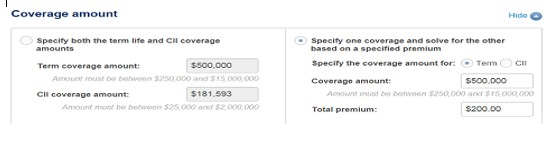
Step 3: Enter the coverage amount for the Term policy and the CII policy. The default option allows you to specify both the term life and CII coverage amounts. Alternately, you can specify one coverage and solve for the other based on a specified premium. For example, if your client knows they need $500,000 of term life insurance and they have a budget of $200 per month, enter the Term coverage of $500,000, enter the total premium of $200 and select Monthly premium frequency. Click “Refresh” and the system will determine the amount of CII coverage based on the total premium.